

Talking about designs can be challenging. Human-readable file names are difficult to make universally understood, especially when designs only have subtle differences between versions. Many times, a conversation can get lost in the woods because it’s unclear which specific design someone is talking about when there have been several iterations. Project team members may end up using phrases like “the blocky one like the superman ‘S’” or “the green one, except I don’t like green.”
It’s hard to keep design files organized. It’s even harder to know what design is a new idea, recall where a variation of an idea came from, or even remember and track how many refinements to a particular concept there are. These are all important things to document, both from a business perspective and for the designer’s sanity.
But what sort of framework can be used to keep track of all the moving parts for a single design? One approach to managing designs is versioning similar to how software is released. Most people are familiar with notifications like “Software update 5.3.1 is available for download.” Those numbers correspond to changes to that piece of software — the first number represents a major change or release, the second number represents a minor change or release, and the third number is a patch or small fix.
This approach to versioning software can be applied to visual design with the three ideas of concept, variation, and revision.

Concept
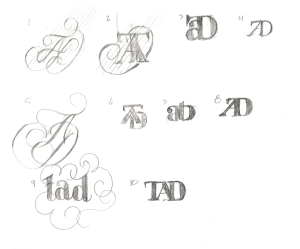
The concept is the starting point for a design — the core idea or possible direction. It may be documented as sketches in a notebook, artboards in a design program, or another format that works best for you. Giving each concept a number is a great place to start when versioning your design files. (1, 2, 3, etc). The example below shows ten initial sketches for a monogram. Each sketch, or concept, is numbered starting with 1.
Variation
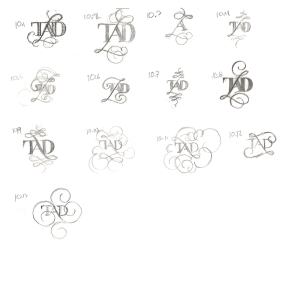
As a design evolves, there are variations of the original concept. These variations can be small changes or large, branching explorations. No matter the scale, it’s important to document every idea that stems from the original sketch. This empowers the designer to find and explore each variation and easily revert to any previous iteration as needed.
To document a variation in a versioning file system, add a second, incremental number. In the example below, the original concept is considered 10.0, making the first variation 10.1.
Revision
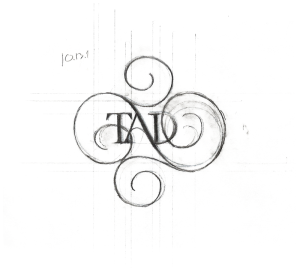
Whether there’s significant feedback on an idea or just some subtle changes to be made (alternative colors, small typographic changes, or alternative arrangements, etc.), it’s good practice to preserve the original design while documenting which refinement on an idea the feedback is related to. In the versioning system we’re following, this translates to incrementing the third number. In the example below, pictured is the first refinement of concept 10.13, so with a revision, it would become 10.13.1 (1.1.1, 1.1.2, 1.1.3, and so on).
When naming files in this manner, it’s easy to know what specific concept, variation, and revision the file refers to. For example, Nike_logo.12.1.15 – This is the twelfth logo concept, the first variation, and the fifteenth revision. Following this format makes things clearer when talking about the designs: “I like 5.1.2” rather than “I like the blue one with black stripes — but not the first one, the second one.”
Here is an example of how this looks with a logo design:
There are automated versioning systems that can be helpful but don’t translate well between media. It’s hard to move from pencil and paper to computer and remember which sketch the digitized design started from, or how many revisions the original concept has seen.
Using this method makes it much easier to track designs, document their history, and talk about them. Designers don’t have to try to come up with clever names for designs or remember which one was actually final. Hopefully, this approach to versioning design files helps keep both your team and workflows more organized moving forward.